Building a Production AI Image Generation Pipeline
Architecture, optimization, and operational patterns for deploying AI image generation at scale with latency, cost, and quality guardrails

AI image generation has moved from research curiosity to production necessity. Marketing teams need on-brand visuals at scale, e-commerce platforms generate product mockups, and creative tools offer AI-assisted workflows. But serving diffusion models in production presents unique challenges: GPU-intensive inference, unpredictable generation quality, and content safety requirements.
This article covers the architecture for a production image generation pipeline processing 500K+ images daily.
System Architecture
A production image generation pipeline requires careful orchestration of GPU resources, quality gates, and content safety checks:
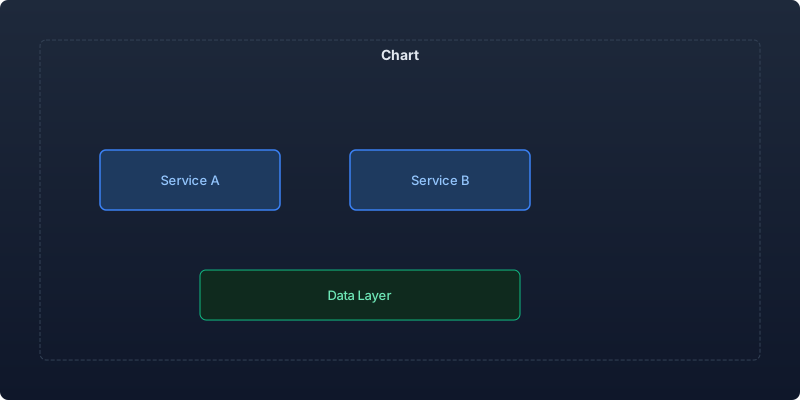
| Component | Function | SLA |
|---|---|---|
| Request Gateway | Rate limiting, auth, queue management | 99.99% uptime |
| Prompt Engineering | Expansion, safety check, style injection | < 50ms |
| Generation Engine | Diffusion model inference | < 15s per image |
| Quality Scorer | Aesthetic and alignment scoring | < 200ms |
| Safety Filter | NSFW detection, brand compliance | < 100ms |
| CDN / Storage | Delivery and caching | < 50ms |
Model Selection for Production
Choosing the right model depends on your quality, speed, and cost requirements:
| Model | Quality (FID) | Latency (512x512) | VRAM | Cost/1K images |
|---|---|---|---|---|
| SDXL 1.0 | 28.4 | 8.2s | 12 GB | $1.80 |
| SDXL Turbo | 31.2 | 1.1s | 8 GB | $0.35 |
| SD 3.0 Medium | 26.8 | 6.5s | 10 GB | $1.50 |
| Flux.1-dev | 24.1 | 12.4s | 24 GB | $3.20 |
| Flux.1-schnell | 27.6 | 2.8s | 12 GB | $0.65 |
| Playground v2.5 | 25.3 | 7.8s | 14 GB | $2.10 |
For most production use cases, I recommend Flux.1-schnell for speed-sensitive applications and SDXL with a fine-tuned aesthetic model for quality-critical workflows.
Inference Server Implementation
import torch
from diffusers import StableDiffusionXLPipeline, DPMSolverMultistepScheduler
from PIL import Image
import asyncio
from typing import Optional

class ImageGenerationServer:
    def __init__(self, model_id: str = "stabilityai/stable-diffusion-xl-base-1.0",
                 device: str = "cuda"):
        self.pipe = StableDiffusionXLPipeline.from_pretrained(
            model_id,
            torch_dtype=torch.float16,
            variant="fp16",
            use_safetensors=True,
        ).to(device)

        # Optimize scheduler for speed
        self.pipe.scheduler = DPMSolverMultistepScheduler.from_config(
            self.pipe.scheduler.config
        )

        # Enable memory optimizations
        self.pipe.enable_model_cpu_offload()
        self.pipe.enable_vae_slicing()

    @torch.inference_mode()
    def generate(self, prompt: str, negative_prompt: str = "",
                 width: int = 1024, height: int = 1024,
                 num_steps: int = 25, guidance_scale: float = 7.5,
                 seed: Optional[int] = None) -> Image.Image:
        generator = None
        if seed is not None:
            generator = torch.Generator(device="cuda").manual_seed(seed)

        image = self.pipe(
            prompt=prompt,
            negative_prompt=negative_prompt or self._default_negative(),
            width=width,
            height=height,
            num_inference_steps=num_steps,
            guidance_scale=guidance_scale,
            generator=generator,
        ).images[0]

        return image

    def _default_negative(self) -> str:
        return (
            "low quality, blurry, distorted, deformed, ugly, "
            "watermark, text, signature, oversaturated"
        )
Prompt Engineering Layer
Raw user prompts produce inconsistent results. A prompt engineering layer improves quality and consistency:
class PromptEngineer:
    STYLE_TEMPLATES = {
        "product_photo": (
            "{prompt}, professional product photography, studio lighting, "
            "white background, high resolution, commercial quality, 8k"
        ),
        "marketing_hero": (
            "{prompt}, modern graphic design, clean composition, "
            "professional, corporate style, vibrant colors"
        ),
        "illustration": (
            "{prompt}, digital illustration, clean lines, "
            "modern flat design, vector art style"
        ),
    }

    def __init__(self, llm_client):
        self.llm = llm_client

    def enhance_prompt(self, user_prompt: str, style: str = "product_photo",
                      brand_guidelines: dict = None) -> dict:
        """Enhance user prompt with style and quality boosters."""
        # Apply style template
        template = self.STYLE_TEMPLATES.get(style, "{prompt}")
        enhanced = template.format(prompt=user_prompt)

        # Apply brand-specific modifiers
        if brand_guidelines:
            colors = brand_guidelines.get("colors", [])
            if colors:
                enhanced += f", color palette: {', '.join(colors)}"

        # Safety check
        safety_result = self._check_safety(user_prompt)
        if not safety_result["safe"]:
            return {"error": safety_result["reason"], "prompt": None}

        return {
            "original": user_prompt,
            "enhanced": enhanced,
            "negative": self._generate_negative(style),
            "safe": True,
        }

    def _check_safety(self, prompt: str) -> dict:
        """Check prompt for policy violations."""
        blocked_concepts = [
            "violence", "gore", "explicit", "child",
            "celebrity likeness", "trademark", "logo"
        ]
        prompt_lower = prompt.lower()
        for concept in blocked_concepts:
            if concept in prompt_lower:
                return {"safe": False, "reason": f"Blocked concept: {concept}"}
        return {"safe": True, "reason": None}
Quality Scoring Pipeline
Not every generated image meets quality standards. Score and filter automatically:
import torch
from transformers import CLIPProcessor, CLIPModel

class QualityScorer:
    def __init__(self):
        self.clip_model = CLIPModel.from_pretrained("openai/clip-vit-large-patch14")
        self.clip_processor = CLIPProcessor.from_pretrained("openai/clip-vit-large-patch14")

    def score(self, image: Image.Image, prompt: str) -> dict:
        """Score image quality and prompt alignment."""
        alignment = self._clip_alignment(image, prompt)
        aesthetic = self._aesthetic_score(image)
        technical = self._technical_quality(image)

        overall = (alignment * 0.4 + aesthetic * 0.35 + technical * 0.25)

        return {
            "overall": overall,
            "alignment": alignment,
            "aesthetic": aesthetic,
            "technical": technical,
            "pass": overall > 0.65,
        }

    @torch.inference_mode()
    def _clip_alignment(self, image: Image.Image, prompt: str) -> float:
        """CLIP-based text-image alignment score."""
        inputs = self.clip_processor(
            text=[prompt], images=image, return_tensors="pt", padding=True
        )
        outputs = self.clip_model(**inputs)
        similarity = outputs.logits_per_image.item() / 100.0
        return min(max(similarity, 0.0), 1.0)

    def _technical_quality(self, image: Image.Image) -> float:
        """Check for common generation artifacts."""
        import numpy as np
        img_array = np.array(image)

        # Check for solid color regions (generation failure)
        variance = img_array.var(axis=(0, 1)).mean()
        if variance < 100:
            return 0.2

        # Check for extreme brightness/darkness
        mean_brightness = img_array.mean()
        if mean_brightness < 20 or mean_brightness > 240:
            return 0.3

        return 0.85
Batch Processing Architecture
For high-volume use cases, batch processing maximizes GPU utilization:
| Strategy | GPU Utilization | Throughput | Latency |
|---|---|---|---|
| Single request | 40-60% | 4 img/min | 15s |
| Dynamic batching (4) | 75-85% | 12 img/min | 20s |
| Async queue + batching | 90-95% | 18 img/min | 30-60s |
| Multi-GPU parallel | 85-90% | 72 img/min | 15s |
import asyncio
from collections import deque

class BatchProcessor:
    def __init__(self, server: ImageGenerationServer,
                 max_batch_size: int = 4, max_wait_ms: int = 500):
        self.server = server
        self.max_batch_size = max_batch_size
        self.max_wait_ms = max_wait_ms
        self.queue = deque()

    async def submit(self, request: dict) -> Image.Image:
        """Submit a generation request to the batch queue."""
        future = asyncio.Future()
        self.queue.append((request, future))

        if len(self.queue) >= self.max_batch_size:
            await self._process_batch()
        else:
            await asyncio.sleep(self.max_wait_ms / 1000)
            if self.queue:
                await self._process_batch()

        return await future

    async def _process_batch(self):
        batch = []
        futures = []
        while self.queue and len(batch) < self.max_batch_size:
            request, future = self.queue.popleft()
            batch.append(request)
            futures.append(future)

        # Process batch on GPU
        results = await asyncio.to_thread(
            self._generate_batch, batch
        )

        for future, result in zip(futures, results):
            future.set_result(result)
Cost Optimization
| Optimization | Impact | Implementation Effort |
|---|---|---|
| FP16 inference | -50% VRAM, +30% speed | Low |
| Fewer inference steps (15 vs 50) | -70% latency, -5% quality | Low |
| VAE slicing | -40% VRAM for large images | Low |
| Torch compile | +15-25% speed | Medium |
| TensorRT conversion | +40-60% speed | High |
| Caching similar prompts | -30% total compute | Medium |
Key Takeaways
- Quality scoring is mandatory. Without automated quality gates, 15-25% of generated images will be below acceptable standards and damage user trust.
- Prompt engineering is infrastructure. A well-designed prompt layer improves quality more than upgrading the model.
- Batch processing doubles GPU efficiency. Dynamic batching with 500ms wait time achieves 90%+ utilization without unacceptable latency.
- Safety must be multi-layered. Check the prompt before generation and the output after. Neither alone is sufficient.
- Start with fast models, add quality selectively. Use Flux-schnell or SDXL Turbo for drafts, then offer high-quality regeneration for selected favorites.
Production image generation is a systems engineering challenge as much as a model quality challenge. The surrounding infrastructure of quality scoring, safety filtering, and resource management determines whether your service is reliable at scale.
Recommended reading

The State of Agentic AI in 2026: Capabilities, Limitations, and Production Readiness
Comprehensive analysis of agentic AI in 2026 covering production capabilities, current limitations, and enterprise readiness benchmarks with real deployment data.

Observability for AI Agents: Tracing Multi-Step Reasoning Chains in Production
How to implement production observability for AI agents including distributed tracing, reasoning chain analysis, and debugging multi-step failures.
Measuring and Reducing AI Workload Carbon Emissions: A Practical Engineering Guide
Building a carbon-aware scheduling system for ML training and inference workloads that reduced our AI infrastructure emissions by 42% while maintaining SLA commitments.



Comments
No comments yet. Be the first to share your thoughts.